How to Play Tactical Swat Simulator
The F-key, Active Tasks, and the difference between a kill and a secure.
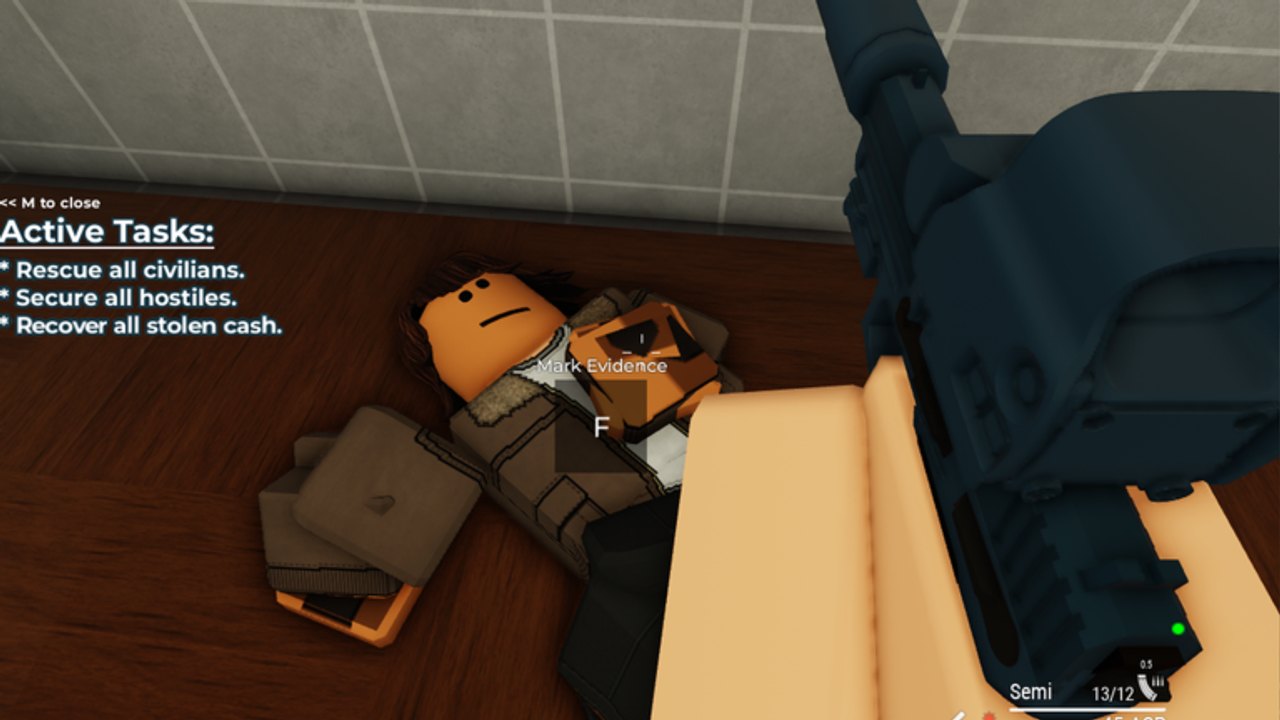
Tactical: Swat Simulator plays like a slow Roblox tactical FPS, not a deathmatch. The HUD is trying to tell you that. Official screenshots show an Active Tasks list, interact prompts on NPCs, ammo and fire-mode in the corner, and a green laser sitting on the gun. If you treat every room like Arsenal, you will print kills and still fail the pad.
This page is the control and scoring layer. Map names live on maps. Gun ranks live on the weapon tier. Day-one order lives on getting started.
Core interact: F
F is the most important key after shoot and reload.
- CuffNPC — appears on surrendered or compliant hostiles and on some downed targets. Hold or tap F to secure them. Secured hostiles count toward “Secure all hostiles.”
- Mark Evidence — appears on bodies, bags, and planted objects. Official raid art shows a downed suspect with a crate prompt and the F key. Marking fills evidence tasks and pays.
- Doors, hostages, and some loot piles use the same key. If a white prompt is on screen, read it before you dump the mag.
On mobile, the prompt is an on-screen button in the same spot as other interact games. Do not bind it away.
M and the task overlay
The overview screenshot includes M to close in the corner of the Active Tasks panel. M toggles that list. If you cannot see Rescue / Secure / Recover, you closed it. Open it again. Playing without tasks visible is how people extract early and wonder why the pad failed.
Typical bank-style tasks:
- Rescue all civilians
- Secure all hostiles
- Recover all stolen cash
House raids and museums swap in evidence or bomb-adjacent objects. Read the list the moment you load. Do not assume every pad is “kill everyone.”
Movement and gun handling
Standard Roblox FPS movement applies: WASD, jump, crouch if bound, shift to sprint where enabled. Lean is not a guaranteed bind in this title the way it is in heavier milsims — do not stand in a doorway “leaning” if the animation never comes. Peek with the camera and footwork.
Fire modes show on the HUD. The evidence screenshot reads Semi 13/12. The bank screenshot reads Pump-Action 7/7. The grenade update added a semi-automatic option for SR-16 and MP5. Use semi in long hallways; spray only when a room is already flashed and you have a backstop that is not a civilian.
Reload before you commit to a stairwell. The homepage hero image is a stack on stairs for a reason: the officer who reloads on the landing eats the first burst from the hallway.
How a room should actually go
- Slow at the door. Listen. If you own a flashbang, cook it into the room, then enter. See latest update for flashbang versus M67.
- Slice the pie. Clear the corner that can see you first.
- Guns first, then F. A hostile still aiming is not a cuff target yet.
- Once hands are up or the NPC is down, cuff and mark. Then move.
- Call or ping if you are in a twelve-player stack so two officers do not flash each other.
Friendly fire exists in spirit even when the damage model is mild. Running past a teammate’s muzzle on Night Exhibit is how stacks wipe.
Civilians, K9, and gadgets
Civilians fail the rescue task if you drop them. Beanbag Shotgun (a cheap gamepass) exists for players who cannot aim a lethal gun near hostages. K9 attacks nearby enemies and can sit — useful, not a replacement for your own cuffs. Medkit heals 90 HP on a 20-second cadence if you bought that pass. None of these gadgets complete Recover stolen cash for you. Walk to the bags.
C4 is a Special Forces exclusive. It opens problems and creates new ones in civilian rooms. Read gamepasses before you blow a wall on Black Apron.
Completing versus extracting
Some pads let you walk back to extract before every task is green. That is a fail wearing a success animation. Stay until the task list is clear, then return to lobby. XP and Cash scale with completion, not with time-to-first-kill. The Cash guide is explicit: sloppy speedruns pay worse than slow perfect raids.
Platform notes
PC players should turn on a visible FPS counter until they know the map. Mobile players should drop graphics if the laser and prompts stutter — missing an F prompt is worse than missing a texture. Console players need a confirm button they will not confuse with melee. The game is MorphToR15 and plays on the usual Roblox device set.
When the gun feels fine but the pad still fails, you have a tasks problem, not a tier-list problem. Open M, finish the list, then go argue about SR-16 versus MP5 on the weapons page.
Frequently Asked Questions
Quick answers to the most common questions.
What does F do in Tactical Swat Simulator?
F is interact: cuff hostiles, mark evidence, and use world prompts. Without it you cannot finish Secure and evidence tasks.
How do I see mission objectives?
Open the Active Tasks overlay. M closes it on PC. Rescue, Secure, and Recover lines are the real win condition.
Should I kill every suspect?
Not if they surrender. Cuff compliant NPCs. Lethal force is for gunfights. Failed rescues and missing secures dump the grade.
Where do I learn maps after controls?
Use the missions walkthrough and the maps database. Controls stay the same; sightlines do not.